


Hive Projects
Studio Management Made Simple
Project Management for Studios
Hive Projects Features
Everything you need to manage projects, track tasks, and collaborate with your team in one powerful, intuitive platform.

Visual Workflow
See all your projects and tasks at a glance with intuitive Kanban boards.
Team Collaboration
Keep everyone aligned with assignments, comments, and real-time updates.
Customizable
Adapt pipeline stages and labels to match your unique workflow.
Secure & Private
Multi-tenant architecture keeps your studio's data completely isolated.
Complete Project Management Solution
From simple task lists to complex multi-stage workflows, Hive Projects gives your studio the tools to stay organized and deliver on time.
Project Management
Organize and track all your studio projects in one place
Kanban Boards
Visual project boards with customizable columns. See work status at a glance and move tasks through your pipeline stages.
Drag & drop
Custom columns
Visual workflow
Multiple Projects
Create separate projects for different productions, events, or initiatives. Each project has its own board and settings.
Unlimited projects
Project archiving
Quick switching
Project Templates
Save time with reusable project templates. Create standardized workflows that can be applied to new projects instantly.
Template library
One-click creation
Consistent workflows
Custom Pipeline Stages
Define pipeline stages that match your workflow. From 'Ideas' to 'Complete', customize columns for any process.
Flexible stages
Color coding
Reorder columns
Task Management
Comprehensive tools for managing every detail of your tasks
Rich Task Details
Create detailed tasks with descriptions, due dates, priority levels, and custom fields. Everything you need in one place.
Due dates
Priority levels
Descriptions
Task Assignees
Assign tasks to team members. Everyone knows what they're responsible for and can filter to see their own work.
Multiple assignees
Team visibility
Workload view
Labels & Categories
Color-coded labels help categorize and organize tasks. Create custom labels that match your team's needs.
Custom colors
Multiple labels
Quick filtering
Checklists
Break down tasks into subtasks with checklists. Track completion progress and ensure nothing gets missed.
Subtask tracking
Progress bars
Completion status
Drag & Drop
Easily move tasks between columns or reorder within a column. Intuitive drag and drop makes organization effortless.
Smooth animations
Touch support
Bulk moves
Due Date Tracking
Set due dates and get visual indicators for upcoming and overdue tasks. Never miss a deadline again.
Date picker
Overdue alerts
Calendar view
Collaboration
Keep your team connected and informed
Comments & Discussion
Threaded comments on every task. Keep all discussion in context with the work being done.
Threaded replies
Mentions
Rich text
Comments & Discussion
Threaded comments on every task. Keep all discussion in context with the work being done.
Threaded replies
Mentions
Rich text
File Attachments
Attach files directly to tasks. Keep all relevant documents, images, and resources organized together.
Multiple files
Preview support
Easy uploads
Activity History
Complete audit trail of all changes. See who did what and when with detailed activity logs.
Full history
Change tracking
User attribution
In-App Notifications
Real-time updates for assignments, comments, and status changes. Stay informed without constant checking.
Real-time alerts
Customizable
Read tracking
Views & Filtering
Find what you need quickly with powerful views
My Tasks View
Personal dashboard showing all tasks assigned to you. See status counts, overdue items, and upcoming work.
Personal focus
Status summary
Priority sorting
Advanced Filters
Filter tasks by assignee, label, status, due date, and more. Save filter combinations for quick access.
Multi-filter
Quick filters
Clear all
Search
Instantly find any task, project, or comment. Full-text search across all your content.
Instant results
Search everywhere
Keyboard shortcuts
Access & Security
Enterprise-grade security for your studio data
Multi-Tenant Security
Complete data isolation between studios. Each workspace is completely separate and secure.
Data isolation
Secure sessions
Encrypted storage
Role-Based Access
Control who can see and do what. Admin, teacher, and staff roles with appropriate permissions.
Admin controls
Staff access
Permission levels
Secure Authentication
Session-based authentication with password hashing. Secure login for all users.
Encrypted passwords
Session management
Logout controls
Mobile & Integration
Access your projects anywhere and connect your tools
Mobile Staff Portal
Simplified mobile-friendly interface for staff. View and update tasks on the go from any device.
Touch optimized
Quick updates
Offline-friendly
Cross-App Integration
Sync data with sibling apps like ShowFlow, Class Manager, and Costume Keeper. Unified ecosystem for studios.
ShowFlow sync
Class Manager
Costume Keeper
Billing & Payments
Flexible pricing and Australian-ready payment processing
Dual Payment Processors
Worldpay integration for AU/NZ studios with hosted payment page for secure card collection. Stripe support for international studios.
Worldpay HPP
Stripe Connect
Recurring payments
Discount System
Automatic multi-class and sibling discounts with tiered pricing. Choose percentage or fixed dollar amounts per child. 'Best Price Wins' or stacking modes with pricing preview.
Tiered sibling discounts
Per-child amounts
Pricing preview
Centralised Accounts
Manage all customer billing from a single Accounts page. View family billing sheets with detailed transaction history, outstanding balance tracking, and quick actions to add charges, credits, or record payments.
Family billing sheets
Outstanding balance tracking
Quick actions
Add charge/credit
Record payments
Magic Features
Smart features for your studio lobby and reception
Kiosk Check-in
Self-service iPad kiosk for student check-in at reception. Simple 6-character URLs (e.g., yoursite.com/kiosk/ABC123) that are easy to type on iPad keyboards.
Simple TV-friendly URLs
iPad-optimised interface
Auto-reset after check-in
Premium TV Display
Location-specific digital signage with configurable templates. Simple 6-character URLs for easy entry on TV browsers (e.g., yoursite.com/tv/ABC123).
4 visual templates
Simple TV-friendly URLs
Secure access
Ready to Streamline Your Studio?
Join Australian dance, music, and performing arts studios already using
Class Manager to save time and grow their business.
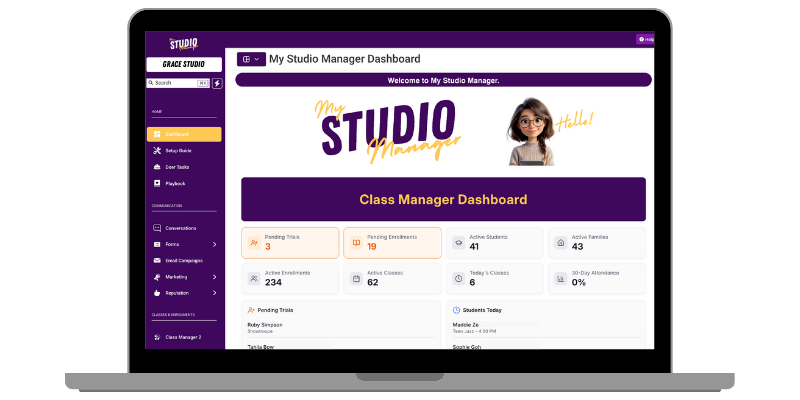
Streamline your studio operations with Class Manager. Manage classes, track attendance, process payments, and communicate with families — all in one place.
With Class Manager in My Studio Manager, everything is handled in one simple system — so you can focus on the dancing, not the paperwork.
📅 Manage your classes with ease
Forget the spreadsheets and paper rolls. Class Manager keeps your studio timetable organised and up to date, without the admin headaches.
✨ Why You’ll Love It:
✏️ Create and edit classes in seconds.
📊 View your whole schedule at a glance.
🕒 Manage seasons, holidays, and recurring classes.
👩🎓 Link classes directly to student and parent records.
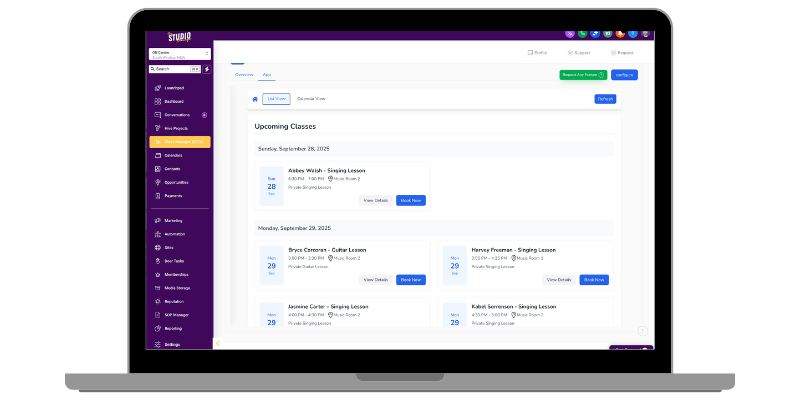
✅ Mark rolls in seconds
Marking attendance doesn’t need to take up your teaching time. With Class Manager, rolls are quick and accurate, from any device.
📲 Mark attendance on your computer, tablet, or phone without having to log in to the system.
🔔 Track attendance and spot patterns early.
📉 Reduce drop-outs by following up on absences.
💬 Access student details directly from the roll. (Coming Soon)
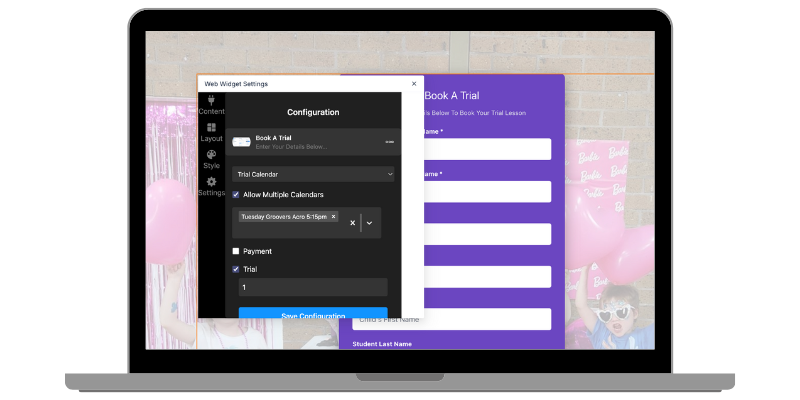
📝 Enrolments & trials made simple
Families can enrol into classes — or book a trial — straight from your website. Everything flows directly into the system.
✨ Key Features:
🌐 Online enrolments sync instantly with your class calendars
🧾 Capture student and parent info directly via the online form.
✅ Restrict class enrolments by age (coming soon)
🙌 Parents can manage classes via the Parent Portal (coming soon)
🤖 Connect enrolments to automations and workflows.
💛 Why studio owners love it
Because it means you don’t need multiple systems anymore. My Studio Manager becomes your one-stop-shop — handling class management, enrolments, trials, rolls, communication, and more.
🙌 Save hours of admin time
💃 Make it easy for families to enrol and trial
🕹️ Keep every tool you need in one simple platform
💻 No more juggling different logins or paying for extra software
🔔 Class Manager is currently in Beta
Our Class Manager module is still in Beta, which means it’s actively being shaped by the feedback of studio owners just like you. We’re rolling out features, refining the experience, and building it step-by-step with your needs in mind.
Even once the module is out of Beta, we’ll never stop improving. My Studio Manager will continue to grow and adapt based on your feedback and requirements, so the system always works the way you need it to.
🚀 Ready to simplify your classes?
With Class Manager, you’ll always know who’s enrolled, who’s trialling, and who’s in the room.
💬 Book a Demo to see it in action or Sign Up For A 30 Day Trial and watch your leads turn into loyal clients!


NAVIGATION
CUSTOMER CARE
LEGAL
FOLLOW US


Copyright 2026. My Studio Manager. All Rights Reserved.